

Legacy Software Modernisation: How to Upgrade Your Business Without Disrupting Operations
Modernising legacy software doesn't always mean replacing everything. Learn how to assess old systems, connect disconnected applications, automate manual workflows and migrate critical functionality in phases.
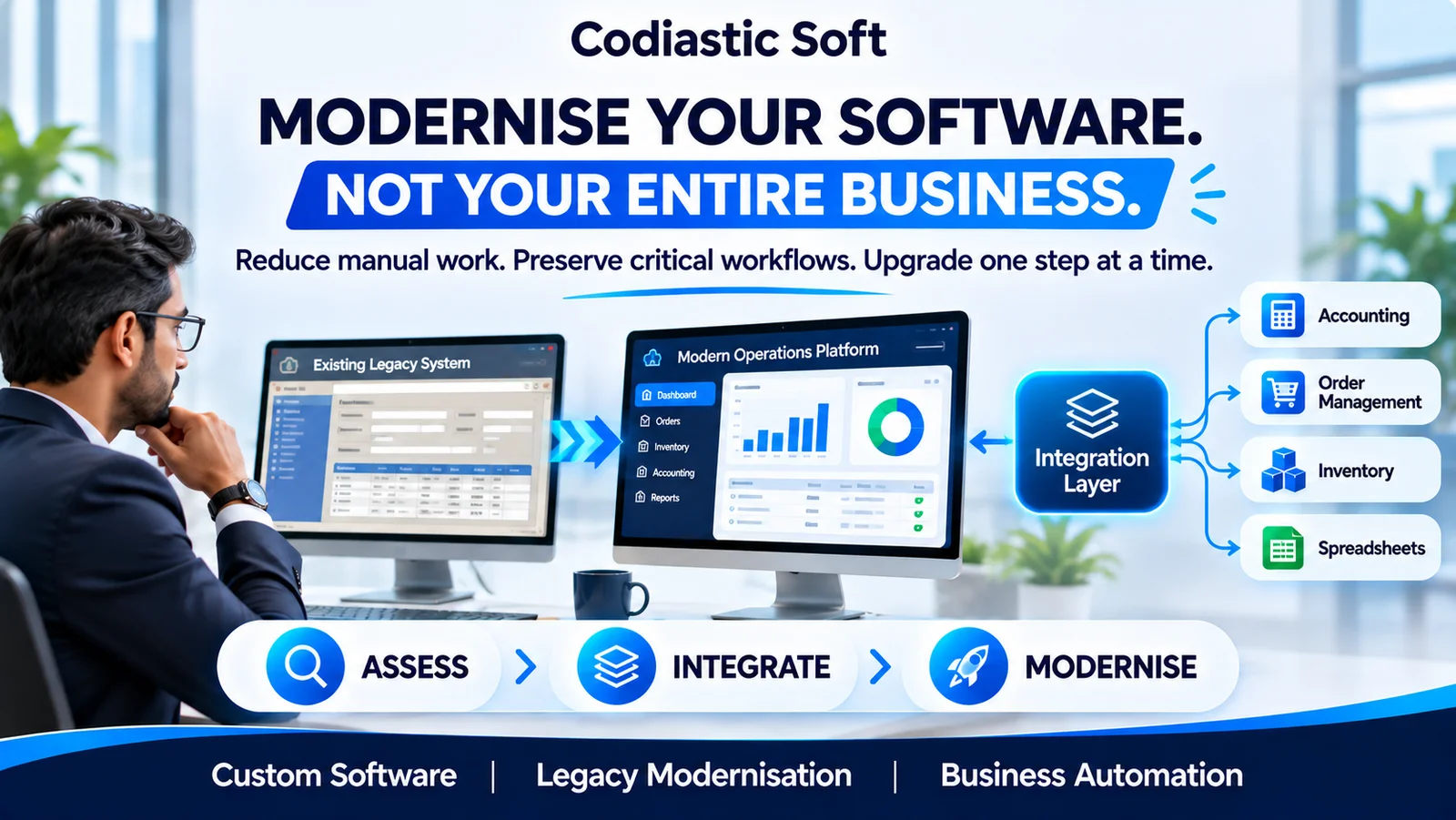
Legacy Software Modernisation: How to Upgrade Your Business Without Disrupting Operations
Many established businesses depend on software that was developed years ago.
It may still handle important business operations, but maintaining it becomes increasingly difficult as the organisation grows.
Employees may rely on spreadsheets to fill gaps in the system. Different departments may use disconnected applications. Reports may require manual exports. Adding a new feature may take weeks because the original architecture is poorly documented.
At some point, business owners and IT managers start asking an important question:
Should we replace the entire application, or can we modernise what we already have?
The answer depends on the system, the business processes and the risks involved.
In many situations, a phased modernisation strategy is more practical than a complete rewrite.
1. What is legacy software modernisation?
Legacy software modernisation is the process of improving an existing software system so that it can support current business requirements, technology standards and future growth.
It can involve:
Updating outdated frameworks and libraries.
Modernising the user interface.
Replacing selected modules.
Migrating databases.
Introducing APIs and integrations.
Automating manual workflows.
Moving infrastructure to a more suitable hosting environment.
Improving security, monitoring and maintainability.
Modernisation does not always mean moving everything to microservices or rebuilding the entire application.
Sometimes the most effective improvement is a better integration between two existing applications.
The right solution should be based on the actual operational problems.
2. Recognise when your business needs modernisation
An older application is not automatically a problem. If it is stable, secure, maintainable and meets business requirements, replacing it may not create enough value.
However, certain signs indicate that a modernisation assessment is worthwhile.
Increasing maintenance costs
Simple changes require extensive development effort because the codebase is difficult to understand or test.
Disconnected business applications
Employees enter the same information into multiple systems, creating duplicate records and inconsistent data.
Dependence on manual workflows
Important business processes rely on spreadsheets, emails, printed documents and individual employee knowledge.
Limited integration capabilities
The existing application cannot easily connect with modern payment gateways, accounting systems, mobile applications or third-party services.
Technology and security concerns
Outdated frameworks, unsupported dependencies or obsolete infrastructure may create operational and security risks.
Difficulty scaling operations
The application may have been suitable for a small business but struggles with higher transaction volumes, additional branches, more users or new workflows.
3. Begin with a technical and business assessment
Before writing code or selecting a new technology stack, understand the current system.
A useful assessment should cover:
Application architecture: Identify the frontend, backend, database, hosting environment, scheduled jobs and external dependencies.
Business workflows: Document how orders, customers, payments, inventory, approvals and reports actually move through the organisation.
Data structure: Understand the database schema, relationships, historical records, duplicate data and migration constraints.
Integration dependencies: Identify APIs, file exchanges, background processes, email services and third-party applications.
Security and access: Review authentication, user permissions, sensitive data handling, backups and access controls.
Operational risks: Identify workflows where downtime or incorrect data could interrupt business operations.
This assessment should produce a prioritised modernisation roadmap, not simply a recommendation to rewrite everything.
4. Choose the right modernisation strategy
Different systems require different approaches.
Strategy A: Modernise the existing application
If the core system is still suitable, you may be able to upgrade its framework, dependencies, database and infrastructure.
This can be less disruptive than replacing the application.
It is particularly useful when business logic is reliable but the technical foundation needs improvement.
Strategy B: Modernise the frontend
Sometimes the backend already handles business operations correctly, but the user experience is outdated.
A new web or mobile interface can be introduced while retaining existing backend services.
This can improve usability without immediately changing critical business logic.
Strategy C: Introduce an integration layer
If multiple applications are working independently, a custom integration layer can connect them.
For example, customer information entered into one application could be synchronised with accounting, inventory and operational systems.
A central operational dashboard may provide visibility while the existing applications continue to own their respective data.
Strategy D: Replace selected modules
If one module is particularly difficult to maintain, replace that functionality independently.
For example, order management may be rebuilt while accounting and inventory continue operating in the existing system.
Strategy E: Rebuild the entire application
A complete rebuild may be justified when the existing application is fundamentally unsuitable, cannot be maintained safely or cannot support essential future requirements.
However, a rewrite should follow a detailed assessment of business rules, dependencies, data migration and operational risk.
5. Modernise incrementally using the Strangler Fig pattern
One recognised approach to legacy modernisation is the Strangler Fig pattern.
Instead of replacing an entire application in one release, selected functionality is moved to a new system gradually.
The two systems coexist while the migration progresses.
The approach can be described in three stages:
Transform: Identify a business capability and implement its modern replacement.
Coexist: Allow the old and new functionality to operate together. Route the relevant requests to the correct implementation and maintain a rollback path.
Eliminate: Once the new functionality is validated and dependencies have been migrated, retire the corresponding legacy functionality.
For example, a business may initially modernise its order-tracking module while keeping the existing accounting and inventory systems.
Once order processing is stable, additional modules can be migrated.
This reduces the need for a risky big-bang transition.
The pattern is not suitable for every small or tightly coupled application, so its feasibility should be assessed before adoption.
6. Treat data migration as a separate workstream
Data migration is often one of the most challenging parts of modernisation.
The old database may contain inconsistent records, undocumented relationships, duplicate customer details and fields that no longer have an obvious purpose.
A safe migration process should include:
Database and schema assessment.
Data profiling and duplicate identification.
Field mapping between old and new structures.
Transformation rules.
Trial migrations using representative data.
Record-count and financial reconciliation.
Application-level validation.
Backup and rollback planning.
Final migration and controlled cutover.
Do not assume that a successful database import means the migration is complete.
The new application must also reproduce the business meaning of the original data.
7. Preserve undocumented business logic
One of the biggest risks in replacing older software is losing rules that were never formally documented.
Consider a distribution company where employees manually annotate printed orders with supplier codes, reservation details and delivery instructions.
Those annotations may appear to be inefficient paperwork, but they may represent essential business rules.
A replacement application needs to capture those rules as structured data, workflow states, permissions and audit history.
Talk to the people who use the existing system every day. Observe real transactions, including exceptions.
The goal is not to reproduce every outdated screen. It is to preserve the business capabilities that actually matter.
8. Build a migration plan that protects business continuity
For a business-critical system, a modernisation project should include:
A clear migration scope.
A dependency map.
Automated regression tests where practical.
Data backup and recovery procedures.
A rollback strategy.
User acceptance testing.
Controlled deployment.
Monitoring after release.
Employee training and documentation.
Where appropriate, run the new and old workflows in parallel for a limited period and compare their outputs.
This can expose missing rules before the business fully switches over.
9. A practical 90-day modernisation roadmap
The exact timeline depends on system size, complexity and team availability, but a phased plan could look like this.
Days 1–15: Discover and assess
Review application architecture.
Map critical workflows.
Identify integrations and dependencies.
Review data and security risks.
Prioritise business pain points.
Days 16–30: Design the target approach
Define the modernisation strategy.
Select the first module or workflow.
Prepare data and API contracts.
Plan testing and rollback.
Estimate effort and infrastructure requirements.
Days 31–60: Build the first improvement
Implement the selected module or integration.
Prepare migration and synchronisation logic.
Add monitoring and audit capabilities.
Conduct integration and regression testing.
Days 61–90: Validate and expand
Run user acceptance testing.
Compare old and new workflows.
Resolve production issues.
Train users.
Review measurable improvements.
Prepare the next modernisation phase.
This is an illustrative roadmap, not a guaranteed delivery schedule. Larger or regulated systems may require considerably more time.
10. Measure whether modernisation is working
Modernisation should produce measurable business improvements.
Track indicators such as:
Time required to complete important workflows.
Number of manual data-entry steps.
Duplicate records and processing errors.
Application availability.
Time required to release changes.
Maintenance effort.
Integration failure rates.
User adoption and support requests.
These metrics help determine whether the project is improving business operations rather than simply changing technology.
How Codiastic Soft can help
Codiastic Soft provides custom software development, SaaS development, web and mobile applications, API integrations and business automation.
We help businesses assess existing software, design modern application architectures, connect disconnected systems and develop custom solutions around operational requirements.
Whether you need to modernise an older web application, migrate a database, introduce a new operational dashboard or gradually replace selected modules, the first step is understanding how your current system works.
Explore our software development services.
Final thoughts
Legacy software modernisation should not begin with the assumption that everything needs to be replaced.
Start by understanding the business. Identify the workflows creating the most friction. Protect the data and business rules that matter. Modernise one capability at a time and validate the result before expanding.
Modernise the technology without losing the business knowledge built into the system.

Written by
Codiastic Soft Team
We build websites, mobile apps, SaaS products and automation for growing businesses in Pune and worldwide. About us →
Keep reading
More from our blog
Software Development
Franchise Management Software: How to Manage Multiple Locations from One Platform
Read article
Software Development
Your App Has an Admin Panel. Can Your Team Actually Run the Business?
Read article
API & Integration Development