

API Integrations for SaaS: How to Connect Systems Without Creating a Maintenance Nightmare
Integrations help SaaS products fit into customers' workflows, but poorly designed connections can become expensive to maintain. Learn how to plan, build and monitor reliable API integrations.
API Integrations for SaaS: How to Connect Systems Without Creating a Maintenance Nightmare
Modern SaaS products rarely operate in isolation.
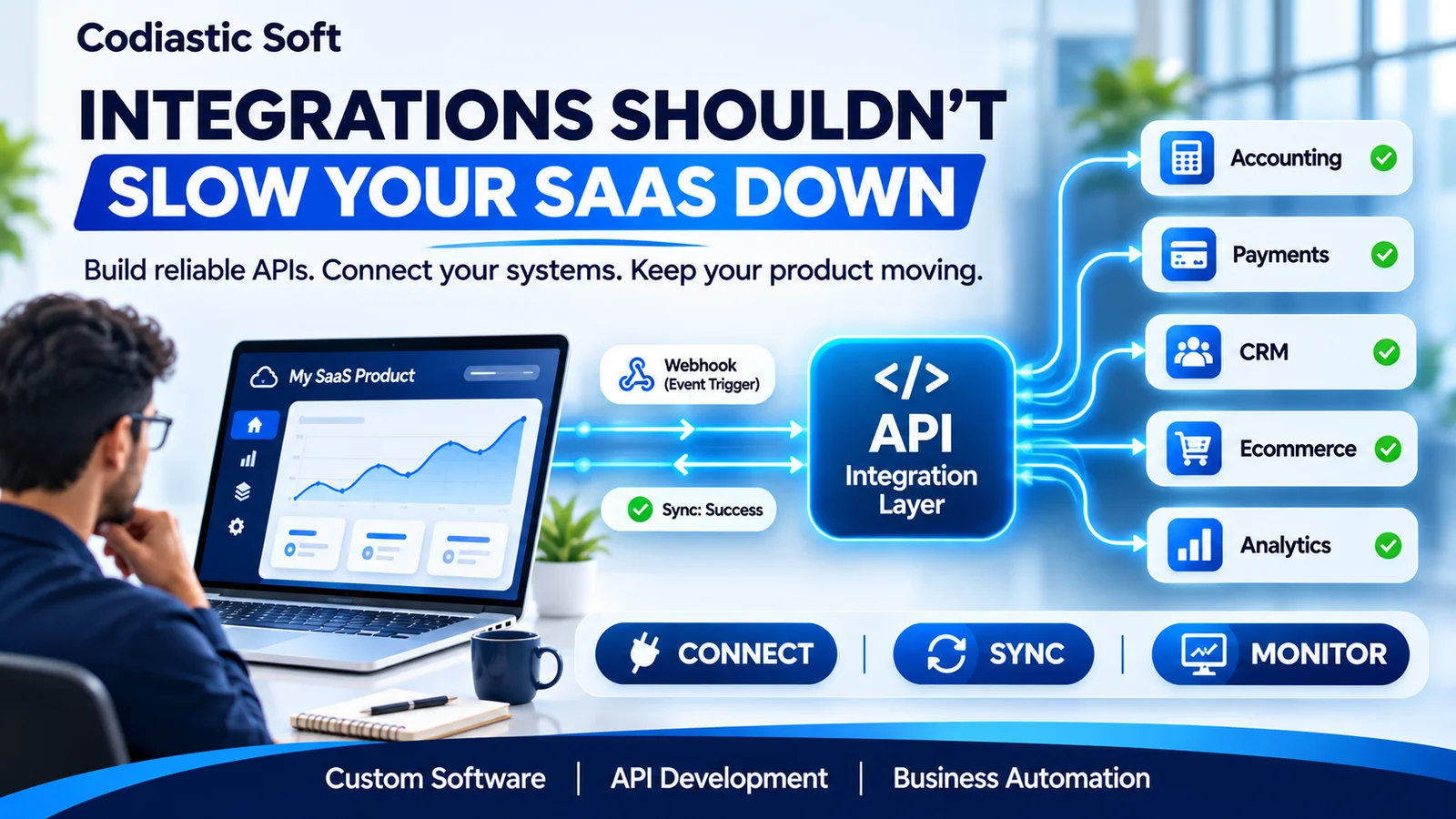
A business may use one platform for accounting, another for payments, a separate CRM for customer management and additional tools for marketing, reporting and operations.
As a result, customers increasingly expect their software applications to communicate with one another.
For a SaaS founder, this creates an important product-development opportunity. Integrations can make a product more useful, remove manual work and improve customer adoption.
However, poorly designed integrations can also become a significant engineering burden.
A connection that takes a few days to develop may require ongoing maintenance because of API changes, authentication failures, rate limits, data inconsistencies and third-party service outages.
The solution is to treat API integrations as a core part of your software architecture rather than a collection of independent development tasks.
1. Why API integrations matter for SaaS products
Consider a SaaS platform used by a business to manage customers and orders.
The business may need to:
Send customer information to its accounting application.
Synchronise orders with an ecommerce platform.
Connect payment transactions with invoices.
Send notifications through external communication services.
Share operational data with analytics platforms.
Without integrations, employees may have to export spreadsheets, copy information between applications and manually reconcile records.
This creates duplicated work and increases the possibility of errors.
A well-designed integration can automate these workflows and make the SaaS product fit more naturally into the customer's existing technology environment.
2. Start with the right integration architecture
One of the biggest mistakes in integration development is placing provider-specific API calls directly inside core business controllers or modules.
For example, imagine that an order-management application connects directly to three different accounting providers.
If the accounting logic is scattered throughout the application, changing a provider or adding another one becomes difficult.
A better approach is to create a dedicated integration layer.
This layer can manage:
Authentication and access tokens.
API communication.
Request and response transformation.
Field mapping.
Webhook handling.
Retry and failure management.
Synchronisation history.
Integration monitoring.
The core application should communicate with the integration layer through clear internal interfaces. Provider-specific implementation details should remain isolated.
This makes the application easier to extend and maintain.
3. Choose the right integration method
Not every integration requires the same implementation approach.
REST APIs
REST APIs are suitable when one system needs to request or update information in another system.
For example, a SaaS application might retrieve customer details from an external platform or create an invoice in an accounting application.
Design clear request and response contracts, validate incoming data and document expected error responses.
Webhooks
Webhooks allow one application to notify another when an event occurs.
For example:
A payment has been completed.
A customer has registered.
An order has been dispatched.
A subscription has been cancelled.
Webhooks are useful when an application should react to events without continuously polling another service.
However, production webhook handling needs signature verification, duplicate-event protection, reliable processing and a reconciliation mechanism for missed events.
Scheduled synchronisation
Some systems do not provide suitable webhooks, or the business requires periodic reconciliation.
In such cases, scheduled jobs can synchronise records at defined intervals.
For example, an accounting integration might periodically compare invoices and payment statuses between two systems.
The synchronisation strategy should reflect how quickly the business needs information to be updated.
4. Build reliability into every integration
An integration is not production-ready just because it works with a successful test response.
External systems can become unavailable, respond slowly, reject requests or change their API behaviour.
A reliable implementation should consider the following.
Timeouts and bounded retries
Set appropriate connection and request timeouts.
Retry transient failures using a bounded retry policy with exponential backoff and jitter. Do not retry every error indefinitely. Invalid credentials, malformed requests and permission failures generally need corrective action rather than repeated attempts.
Idempotency
Suppose a payment provider sends the same webhook more than once.
If your application processes every delivery as a new payment, duplicate records or incorrect financial totals may result.
Use unique event identifiers, idempotency keys or processed-event records to prevent duplicate side effects.
Rate-limit handling
External providers may limit the number of API requests allowed in a given period.
Respect rate-limit responses, use appropriate delays and avoid unnecessary repeated requests.
Secure authentication
Protect access tokens and secrets. Implement token refresh where supported, use the least permissions required and avoid exposing credentials in logs.
API versioning
External providers can introduce new API versions and deprecate older contracts.
Track the versions you depend on, monitor provider announcements and test changes before updating production integrations.
5. Design for failed synchronisation, not just successful synchronisation
A particularly important question is:
What happens when the integration fails halfway through a business operation?
Imagine that a customer places an order in your application, but the external accounting system is temporarily unavailable.
Should the order be lost? Should the customer be asked to submit it again? Should the application keep retrying?
A robust approach is to record the intended operation durably and process it through a background worker when appropriate.
A useful integration workflow can look like this:
Validate the business operation.
Save the required local transaction.
Record an integration job.
Process the job asynchronously.
Record the external response and synchronisation status.
Retry eligible failures within defined limits.
Alert the team when manual intervention is required.
The application should also provide a way for authorised administrators to inspect failed records and safely retry them.
This makes failures visible instead of silently losing data.
6. Build monitoring and observability into the integration layer
An integration should have an operational view, not just a code implementation.
Useful information to capture includes:
Integration provider and connected account.
Last successful synchronisation.
Last attempted synchronisation.
Request and response status.
Failed record identifiers.
Retry count.
API response time.
Authentication or token-refresh status.
Current integration health.
Use correlation IDs to trace a business operation across your application and its external dependencies.
Avoid logging passwords, access tokens, payment credentials or sensitive customer data.
Monitoring helps development teams identify whether a failure is caused by their own application, an external provider or a data-mapping issue.
7. Should you build custom integrations or use an integration platform?
There is no universal answer.
Approach | Suitable use case | Main consideration |
|---|---|---|
Custom API development | Complex business logic and deeper control | Initial development and ongoing maintenance |
Automation tools | Simple workflows between existing applications | Pricing, limitations and workflow complexity |
Embedded integration platform | SaaS products where customers connect their own accounts | Platform fees, connector coverage and control |
Native provider integration | A high-value, frequently requested connection | Provider-specific maintenance |
For example, a simple internal notification workflow may not justify a custom integration service.
However, if your SaaS product needs to synchronise financial transactions, handle complex permissions or support customer-specific business rules, custom development may provide better control.
Make the decision using the total cost of ownership, not just the initial development estimate.
8. A practical checklist before launching an API integration
Before deploying an integration to production, verify:
Authentication and permissions are configured correctly.
Required fields and data mappings are validated.
Timeouts and retry policies are defined.
Duplicate requests and webhook events are handled safely.
Rate limits are respected.
Sensitive information is protected.
Logs and monitoring are available.
Failed records can be inspected and retried.
API version and compatibility requirements are documented.
Integration tests cover both success and failure scenarios.
Ownership and ongoing maintenance responsibilities are clear.
How Codiastic Soft can help
At Codiastic Soft, we work on custom software development, SaaS platforms, API integrations, web and mobile applications, and business automation.
We help businesses connect applications, develop custom backend services, integrate third-party APIs and build software workflows around their operational requirements.
Whether you need to connect two existing platforms, introduce integrations into a SaaS product or modernise an existing integration architecture, the first step is understanding your systems, data flows and business requirements.
Explore our software development services.
Final thoughts
Integrations should make a software product more useful, not make its engineering team permanently busy fixing broken connections.
Start with the integrations that matter most to customers. Keep provider-specific logic separate. Design for duplicate events and failures. Monitor every connection after deployment.
A reliable integration is not simply an API request that succeeds once.
It is a connection that continues to work safely and predictably as your product, customers and external systems evolve.

Written by
Codiastic Soft Team
We build websites, mobile apps, SaaS products and automation for growing businesses in Pune and worldwide. About us →
Keep reading
More from our blog
Software Development
Legacy Software Modernisation: How to Upgrade Your Business Without Disrupting Operations
Read article
SaaS & Product Development
Your SaaS MVP Is Live. What Should You Do Next?
Read article
AI & Automation