
How to Build an AI Email Assistant That Actually Gets Business Work Done
An AI email assistant should do more than summarize messages. With the right integrations, it can classify enquiries, extract important details, prepare quotations, suggest meeting times, and draft responses for approval. Learn how to design an AI-powered workflow that saves administrative time while keeping people in control of important business decisions.
How to Build an AI Email Assistant That Actually Gets Business Work Done
Many business owners spend a surprising amount of time managing email.
A typical day might involve responding to pricing enquiries, preparing quotations, chasing unpaid invoices, arranging meetings, updating customer records, and answering questions that have already been answered dozens of times.
Each task may seem small. Together, they can consume hours that could otherwise be spent serving customers or growing the business.
This is where an AI email assistant can become useful.
But there is an important distinction between an AI tool that summarizes your inbox and an AI system that helps complete business workflows.
The real opportunity is not simply to write emails faster. It is to turn incoming messages into the next appropriate business action.
1. What should an AI email assistant actually do?
Imagine receiving these messages:
“Could you send me a quotation for 50 users?”
“Can we schedule a product demonstration next week?”
“Please send the invoice for last month's work.”
“What is the status of my order?”
“We haven't received the payment reminder.”
A conventional email assistant might summarize each message or suggest a reply.
A workflow-oriented AI assistant can go further.
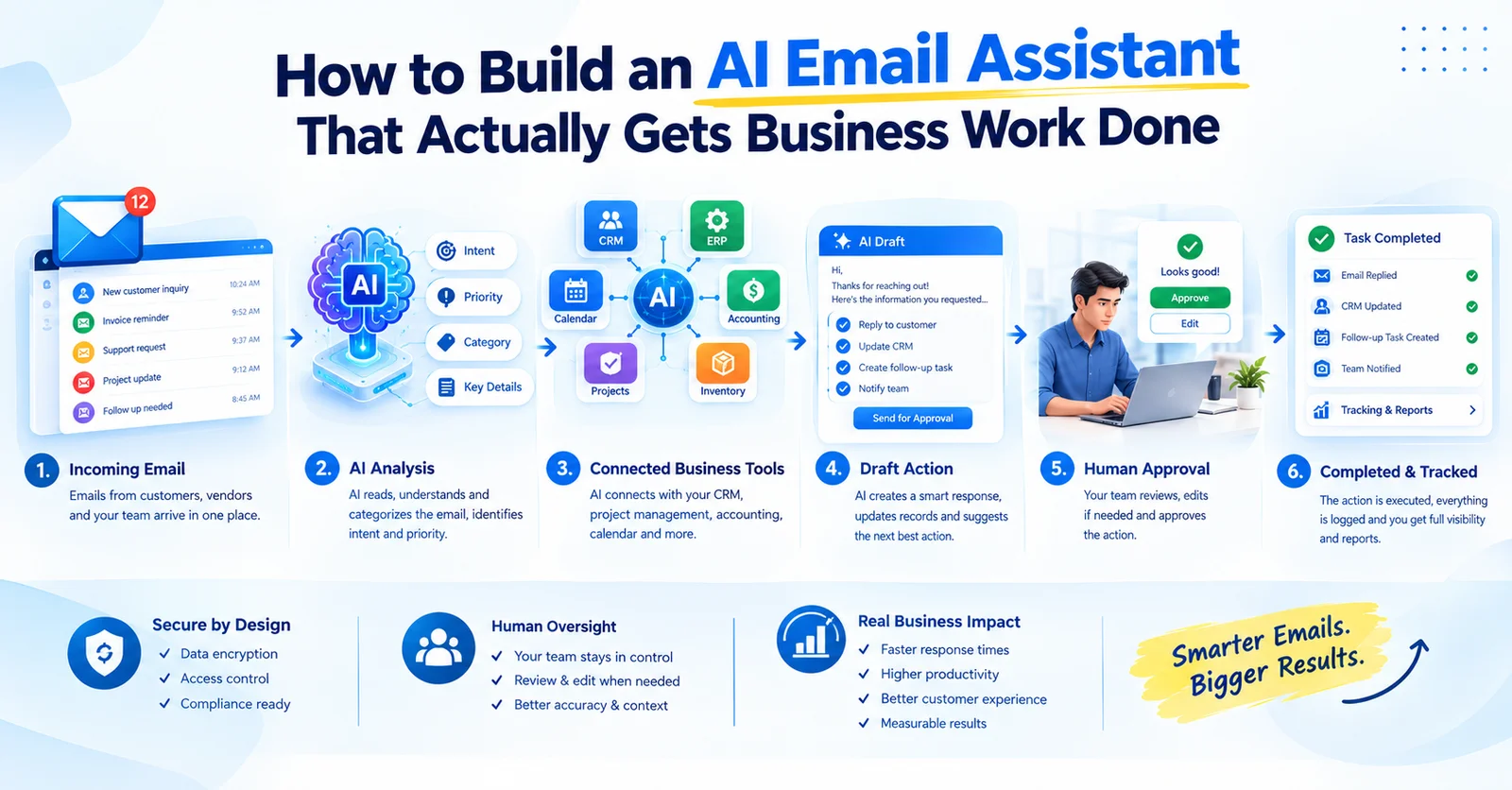
It can identify the type of request, extract relevant information, retrieve authorized business context, prepare a response, and suggest the next action.
For example:
The result is a workflow that connects email with the tools a business already uses.
2. Start with one repetitive workflow
A common mistake is attempting to build an AI assistant that handles every possible email from day one.
A better approach is to choose one repetitive, measurable problem.
For example:
Quotation requests
When an enquiry arrives, the assistant could:
Identify that it is a quotation request.
Extract the requested service, quantity, timeline, and other details.
Identify missing information.
Retrieve approved pricing and proposal templates.
Prepare a quotation draft.
Send it to an authorized employee for review.
Record the outcome in the appropriate business system after approval.
This workflow has a clear business objective: reduce the time required to prepare a quotation while maintaining control over pricing and commitments.
Other useful starting points include meeting coordination, invoice-status enquiries, lead qualification, customer follow-ups, and routine support requests.
Choose the workflow that is repetitive, frequent, and easy to evaluate.
3. Connect the assistant to existing business systems
An AI assistant becomes more useful when it can access the right information through authorized integrations.
Depending on the business, these connections might include:
Email services
Calendar platforms
Customer databases
Quotation and invoicing systems
Accounting software
Order-management systems
Project-management tools
Internal knowledge bases
Business APIs
Suppose a customer asks for an update on an order.
The assistant should not guess the answer from the email alone. It should retrieve the relevant order status from an authorized source, then draft a response based on that information.
This requires more than a language model. It requires secure APIs, permission checks, reliable data retrieval, error handling, and clear business rules.
AI supplies interpretation and reasoning; connected software supplies trusted business context and controlled actions.
4. Keep human approval for consequential actions
An AI assistant should not automatically receive unrestricted access to a company's email, payment systems, or customer database.
A safer design separates actions by risk.
Low-risk actions
Depending on the implementation, these might include categorizing an email, extracting a reference number, or preparing an internal summary.
Review-required actions
These could include sending an external quotation, issuing an invoice, changing a customer record, or sending a commercially significant response.
Restricted actions
Payments, refunds, sensitive account changes, and other high-impact operations should have explicit authorization and appropriate controls.
The exact boundaries depend on the business.
A practical first release might allow the AI to prepare drafts but require an authorized person to approve external messages and financial actions.
This gives the business useful automation without handing over every decision.
5. Design for mistakes and uncertainty
AI systems can misunderstand a message, extract the wrong amount, confuse two customers, or generate a response that sounds confident but is incorrect.
The system needs a plan for these cases.
For example:
If important information is missing, ask for clarification.
If two customer records look similar, request human review.
If a price cannot be verified, do not invent one.
If an integration fails, retain the task and show its status.
If confidence is insufficient, escalate instead of guessing.
If an action is attempted twice, prevent unintended duplication where possible.
It should also keep a record of the source information, proposed action, approval, and final result.
These controls are especially important when the assistant interacts with financial, customer, or operational systems.
6. What does the technical architecture look like?
A typical implementation might contain the following components:
Email provider
Receives new messages and triggers processing.
Workflow service
Validates incoming events, tracks task state, and coordinates processing.
AI model
Classifies intent, extracts structured details, and prepares a draft or proposed action.
Business integrations
Retrieve authorized customer, pricing, invoice, calendar, or order information.
Approval interface
Allows an authorized person to review, edit, approve, or reject the proposed action.
Execution service
Performs approved actions through controlled APIs.
Database and audit log
Record task status, relevant references, approvals, errors, and outcomes.
Monitoring
Identifies failed tasks, integration problems, unusual activity, and processing backlogs.
A simplified flow is:
Email → Intent classification → Data retrieval → Proposed action → Human approval → Execution → Audit trail
For more complex workflows, background queues, retries, idempotency controls, and escalation rules can help make processing reliable.
7. Protect customer data and business access
Email often contains personal information, commercial details, attachments, and sensitive conversations.
Before connecting an AI assistant to real business accounts, define:
Which mailboxes it can access.
Which users can view its results.
Which systems it can query.
Which actions it can perform.
What information may be sent to the AI provider.
How credentials and API permissions are managed.
How long messages and processing logs are retained.
How users can review or revoke access.
Treat email content as untrusted input. A message should never be able to override system permissions or persuade an assistant to disclose data it is not authorized to access.
Use least-privilege permissions, validate tool requests, protect secrets, and maintain an audit trail.
8. Measure business outcomes, not just AI activity
A system can process thousands of emails and still fail to create meaningful value.
Before deployment, establish a baseline.
Measure how much time the team currently spends on the selected workflow, then compare results after introducing the assistant.
Useful metrics include:
Average handling time per request.
Time from enquiry to response.
Percentage of drafts approved without substantial changes.
Incorrect or incomplete responses.
Tasks requiring human escalation.
Failed integrations.
Duplicate actions.
Customer satisfaction.
Total operating and maintenance cost.
Don't measure success only by the number of AI calls or emails processed.
The goal is to improve the business process without introducing unacceptable errors or additional work.
9. Start with a small pilot
A sensible implementation plan is:
Phase 1: Select the workflow
Choose one repetitive email-driven task with a clear business outcome.
Phase 2: Map the process
Document the inputs, required data, decision rules, exceptions, and final actions.
Phase 3: Build the integration
Connect the email provider with the minimum necessary business systems.
Phase 4: Add AI and approval controls
Let the assistant classify requests and prepare proposed actions while keeping important decisions under human control.
Phase 5: Test real-world scenarios
Test ambiguous emails, missing information, duplicate events, unavailable APIs, unauthorized requests, and incorrect AI outputs.
Phase 6: Run a controlled pilot
Begin with a limited mailbox, a small group of users, and carefully defined permissions.
Phase 7: Measure and improve
Evaluate time saved, error rates, approval patterns, and operating cost before expanding.
This approach helps a business validate the value before investing in a broad automation platform.
Final recommendation
An AI email assistant should not be treated as just another chatbot.
Its real value comes from connecting language understanding with business data, existing software, controlled actions, and measurable workflows.
Start with one repetitive problem. Connect only the systems needed to solve it. Keep humans in control of consequential actions. Test failure cases, protect sensitive information, and measure whether the workflow genuinely improves.
At Codiastic Soft, our broader software-development work spans custom applications, integrations, automation, and AI-enabled solutions. These projects require more than a model: they require reliable software that fits the way a business actually operates.
The best AI assistant isn't the one that sends the most messages. It's the one that helps the business complete the right work, safely and consistently.

Written by
Codiastic Soft Team
We build websites, mobile apps, SaaS products and automation for growing businesses in Pune and worldwide. About us →
Keep reading
More from our blog
Artificial Intelligence
AI Defect Detection in Manufacturing: What You Need Before Building a Computer Vision System
Read article
Artificial Intelligence
What Business Processes Should You Automate With AI? A Practical Guide
Read article
AI & Automation