
AI Document Processing for Businesses: Automate Invoices, Purchase Orders & Data Entry
Discover how businesses can use AI document processing to extract information from invoices, purchase orders and forms, validate data, and automate workflows across existing software systems.
AI Document Processing for Businesses: Automate Invoices, Purchase Orders & Data Entry
Every growing business handles documents.
Invoices arrive through email. Purchase orders are shared as PDFs. Vendors send receipts and delivery notes. Employees fill out forms. Accounting and operations teams manually copy information from these documents into business software.
When document volumes increase, this routine work can become a major operational bottleneck.
Employees spend valuable time reading documents, entering data, checking values, matching records, and following up on missing information.
What if your business software could read these documents, extract the important information, validate it, and prepare the next action automatically?
This is where AI-powered document processing can help.
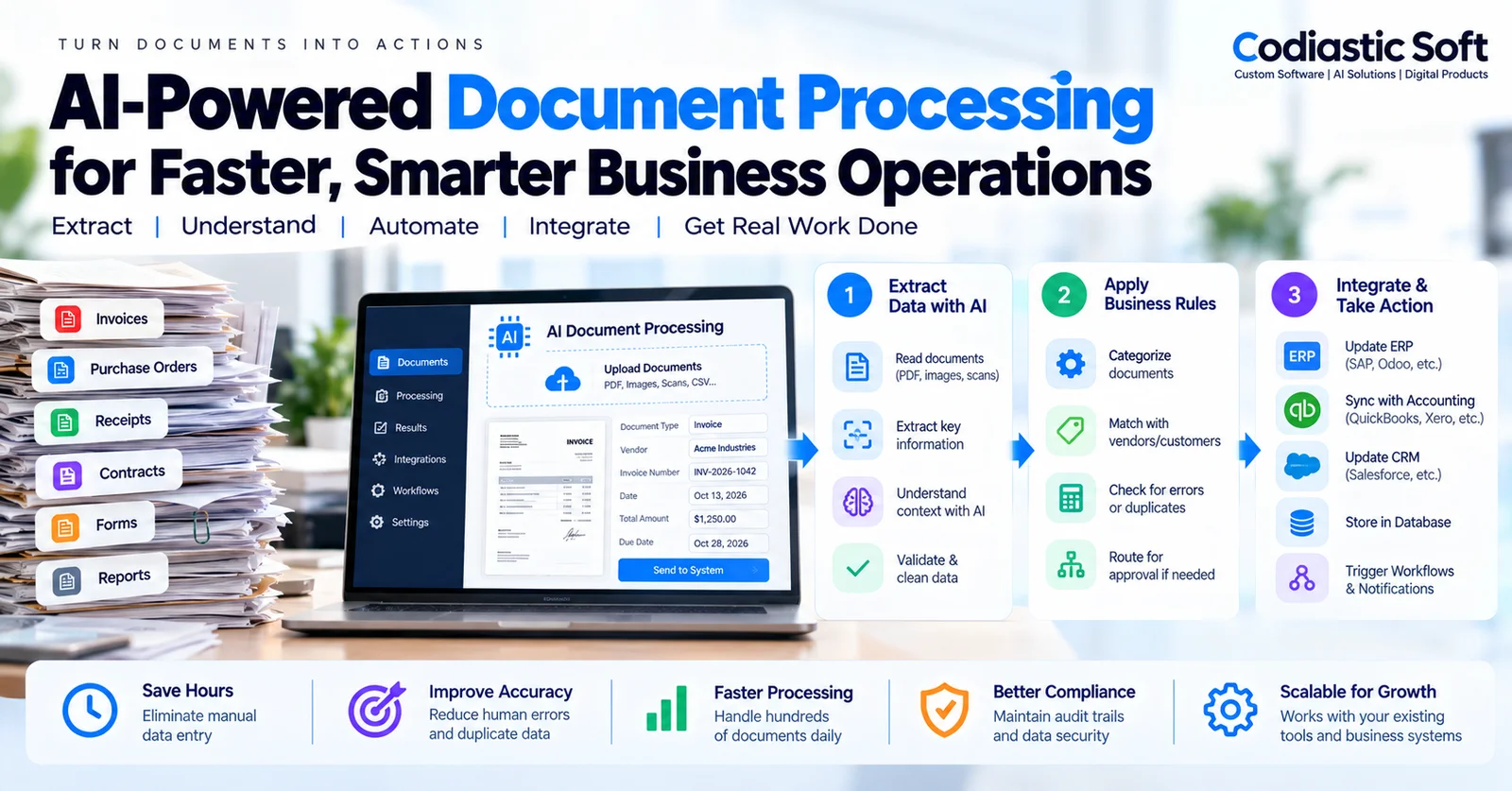
Modern document automation combines optical character recognition (OCR), AI-based information extraction, business rules, and integrations with existing software systems.
The goal is not simply to convert a PDF into text. It is to turn incoming documents into reliable business actions.
What Is AI Document Processing?
AI document processing is the use of software and artificial intelligence to capture, understand, classify, and extract information from business documents.
Traditional OCR converts visible text in a scanned document or image into machine-readable text.
AI-powered document processing goes further by identifying the meaning and structure of the information.
For example, a business invoice may contain:
Vendor name and contact information
Invoice number
Invoice date and due date
Purchase order reference
Product or service descriptions
Quantity and unit price
Tax information
Total amount and currency
Payment instructions
An intelligent document processing system can identify these fields even when different vendors use different invoice layouts.
However, extraction alone is not enough.
The system must also validate the information and determine what should happen next.
Why Manual Document Processing Becomes a Business Problem
Manual document processing may seem manageable when a business receives only a few documents every day.
As operations expand, several problems can emerge.
1. Repetitive Data Entry
Employees repeatedly transfer information from emails, PDFs, and scanned documents into accounting systems, ERP applications, spreadsheets, or internal portals.
This creates unnecessary administrative work.
2. Data Entry Errors
Incorrect invoice numbers, duplicate records, missing tax information, and mismatched amounts can create reconciliation problems.
Automation can help detect inconsistencies, but businesses still need validation rules and review procedures.
3. Slow Approval Workflows
An invoice may need to be reviewed by the operations team, verified against a purchase order, and approved by finance.
When this process depends on emails and manual follow-ups, approvals can become difficult to track.
4. Disconnected Business Systems
A company may use separate applications for procurement, accounting, inventory, customer management, and reporting.
Without integrations, employees may enter the same information into multiple platforms.
5. Limited Visibility
When documents are processed manually, managers may struggle to answer questions such as:
How many invoices are waiting for approval?
Which purchase orders have mismatched amounts?
How many documents were processed this week?
Which vendors frequently submit incomplete information?
Where are delays occurring?
A centralized document-processing workflow can provide better visibility into these activities.
How AI Document Processing Works
A practical document automation system generally follows five stages.
Step 1: Document Collection
Documents enter the system through one or more supported channels.
These may include:
Email attachments
Web portal uploads
Mobile applications
Shared document repositories
API integrations
Scanned paper documents
For example, a supplier may email an invoice to a company's accounts department.
The automation system detects the attachment and creates a processing record.
Step 2: Document Classification
The system identifies the document type.
Examples include invoices, purchase orders, receipts, delivery notes, contracts, application forms, and expense claims.
Classification is important because different document types require different fields and workflows.
An invoice might need vendor matching and tax validation, while a purchase order might need inventory and procurement checks.
Step 3: Information Extraction
OCR and AI-based extraction identify relevant information.
For an invoice, the extracted data may include:
Field | Example |
|---|---|
Document type | Invoice |
Invoice number | INV-2026-1042 |
Vendor | Example Industries |
Invoice date | 13 October 2026 |
Total amount | ₹48,500 |
Purchase order reference | PO-2048 |
These values are illustrative.
The extraction engine should produce structured output that the application can validate and process.
For complex documents, the system may also need to extract line items, tables, handwritten information, or multi-page relationships.
Step 4: Business Rule Validation
This is one of the most important parts of the workflow.
AI-generated information should not automatically be treated as correct.
The application should validate extracted data against known business rules.
For example:
Does the vendor exist in the ERP?
Is the invoice number already recorded?
Does the purchase order exist?
Does the invoice total match its line items and taxes?
Is the currency supported?
Is the invoice date valid?
Does the amount require management approval?
If information is missing or inconsistent, the document should be routed for review.
The system should distinguish between a successfully extracted field and a verified business fact.
Step 5: Integration and Action
After validation, the system can prepare or execute an approved action.
Depending on the business workflow, this might involve:
Creating a draft invoice in accounting software
Updating a procurement record
Matching a purchase order with a delivery receipt
Creating an expense claim
Sending a document to an approval queue
Updating a custom ERP or business application
Triggering an internal notification
Sensitive actions, particularly payments and financial postings, should use appropriate authorization and approval controls.
The objective is reliable workflow automation, not unrestricted autonomous decision-making.
Real-World Business Use Cases
Use Case 1: Invoice Processing for Accounting Teams
A company receives invoices from multiple vendors every day.
Instead of manually entering each invoice, the system:
Receives the invoice.
Extracts vendor details, invoice number, dates, amounts, and line items.
Checks for duplicate invoices.
Matches the vendor and purchase order.
Routes exceptions for human review.
Creates an approved draft record in accounting software.
This can reduce repetitive work and make processing status easier to track.
Use Case 2: Purchase Order Processing for Distributors
A distributor receives purchase orders from customers in different formats.
The system identifies product codes, quantities, prices, delivery addresses, and requested dates.
It then validates the information against the product catalogue and available business rules.
Approved records can be passed to the order-management system.
Use Case 3: Delivery Documents in Logistics
Logistics businesses may process delivery notes, proof-of-delivery documents, receipts, and shipment paperwork.
AI-assisted extraction can help associate documents with the correct shipment and flag missing or inconsistent information.
This is especially useful when documents arrive through multiple channels.
Use Case 4: Employee Expense Management
Employees submit receipts and expense claims.
The system extracts merchant names, dates, totals, and categories, then checks the claim against company policies.
Approved claims can be forwarded to finance while unusual or incomplete submissions are flagged.
Use Case 5: Forms and Applications
Businesses that collect application forms, onboarding documents, or service requests can use document processing to populate internal systems.
However, personal and confidential information requires careful handling, access controls, and retention policies.
AI Document Processing vs Traditional OCR
Traditional OCR and AI-powered document processing are related, but they solve different parts of the problem.
Capability | Traditional OCR | AI-Powered Document Processing |
|---|---|---|
Recognize printed text | Yes | Yes, often using OCR |
Understand document categories | Requires additional logic | Can use trained or AI-based classification |
Extract variable fields | Often template-dependent | Can support different layouts |
Interpret document context | Limited | More flexible, but imperfect |
Validate business rules | Requires application logic | Still requires application logic |
Update ERP or accounting software | Requires integration | Still requires integration |
An important distinction is that AI does not eliminate the need for software engineering.
Business rules, APIs, database transactions, approvals, exception handling, and audit logs remain essential.
What Technology Is Needed?
The exact architecture depends on the documents, expected volume, accuracy requirements, and existing business systems.
A typical solution may include:
Frontend: A web dashboard for uploads, document review, approval queues, and processing history.
Backend: APIs and workflow services that manage document processing, validations, permissions, and integrations.
Document extraction: OCR and suitable AI models for classification and structured information extraction.
Database: Structured storage for document metadata, extracted values, processing states, and audit history.
File storage: Secure object storage for original documents and approved outputs.
Background processing: Queues and workers to handle uploads, extraction jobs, retries, and long-running operations.
Integrations: Connectors for ERP, accounting, inventory, procurement, and custom software systems.
For a custom implementation, technologies such as Next.js, FastAPI, PostgreSQL, Redis-based background processing, and AWS services may be suitable, depending on the project requirements.
The architecture should be selected after understanding the workflow rather than choosing tools first.
How to Make Document Automation Reliable
A successful system needs more than a good extraction model.
Confidence and Review
Low-confidence fields, ambiguous documents, and unusual values should be flagged for review.
Confidence thresholds should be tested against actual business documents rather than treated as universal guarantees.
Duplicate Prevention
Documents may arrive multiple times through email, uploads, or retries.
The application should detect likely duplicates and prevent repeated financial or operational actions.
Audit Logs
The system should record when a document was received, what information was extracted, which validations were performed, who approved changes, and which downstream action occurred.
Security and Privacy
Use appropriate encryption, access controls, document retention policies, secure integrations, and monitoring.
Businesses should evaluate where sensitive document data is processed and stored, including any external AI providers.
Error Handling
Unreadable files, incomplete documents, failed integrations, and processing timeouts should move into defined exception states.
The system should support safe retries without creating duplicate records.
Human Approval
Not every document should be processed automatically.
High-value transactions, financial postings, uncertain matches, and sensitive changes may require explicit human approval.
How Much Does AI Document Processing Cost?
The cost depends on the complexity of the workflow and the number of systems involved.
Important factors include:
Number and variety of document types
Monthly document volume
Scanned document quality
Required field and line-item extraction
Validation and approval complexity
Number of external integrations
Security and compliance requirements
Infrastructure and AI processing costs
Monitoring, support, and maintenance
A simple invoice extraction workflow is very different from an enterprise document automation platform supporting multiple departments and complex approvals.
For this reason, businesses should begin with a clearly defined pilot instead of requesting an estimate for a broad, undefined AI platform.
How to Start With a Practical MVP
A good first version should focus on one document type and one measurable workflow.
For example, an invoice-processing MVP might include:
PDF and image uploads.
Invoice classification.
Extraction of selected fields.
Vendor and duplicate checks.
A human review dashboard.
Export or draft creation in an existing accounting system.
Processing history and audit logs.
Test the system using real, permissioned documents that represent normal cases and exceptions.
Measure field-level accuracy, correction effort, exception rate, processing time, and successful downstream actions.
Once the workflow is reliable, the business can expand to additional document types and integrations.
Final Thoughts
AI-powered document processing can help businesses reduce repetitive data entry and improve the way information moves between departments and software systems.
But the greatest value does not come from simply reading a document with AI.
It comes from connecting document understanding to validated business workflows.
A well-designed system should extract information, verify it, apply business rules, involve people when necessary, and update the correct business application safely.
At Codiastic Soft, we develop custom software, business platforms, integrations, and AI-powered automation solutions designed around practical operational requirements.
If your team spends significant time manually processing invoices, purchase orders, forms, or other documents, the right starting point is to identify one repetitive workflow and evaluate whether automation can deliver measurable value.
Explore our AI and automation work, software development services, and portfolio.
Want to automate document processing in your business?
Contact Codiastic Soft to discuss your document types, existing software, approval requirements, and a practical MVP roadmap.
Frequently Asked Questions
Can AI extract data from scanned invoices?
Yes. OCR and AI-based extraction can process many scanned invoices, although results depend on image quality, document layout, handwriting, and other factors. Important fields should be validated before business actions occur.
Can AI document processing integrate with existing ERP software?
Often, yes. Integration depends on the ERP's APIs, supported import mechanisms, permissions, and architecture. Some systems may require a custom integration layer.
Can AI process invoices without human involvement?
Some low-risk, well-defined cases can be automated after adequate testing. Exceptions, uncertain values, and sensitive financial actions may still require human approval.
Is AI document processing suitable for small businesses?
Yes, when document volumes or repetitive work justify the implementation and operating costs. A narrowly scoped workflow is often a better starting point than a large platform.
How long does implementation take?
Timelines depend on document complexity, integration requirements, data availability, and acceptance criteria. A technical discovery phase is needed before giving a reliable estimate.
What is the difference between AI document processing and a chatbot?
A chatbot primarily provides a conversational interface. Document processing is a workflow capability that extracts structured information, validates it, and connects it to business operations. A chatbot may be one interface to such a system, but it is not required.

Written by
Codiastic Soft Team
We build websites, mobile apps, SaaS products and automation for growing businesses in Pune and worldwide. About us →
Keep reading
More from our blog
AI & Automation
AI Voice Agents for Business: Use Cases, Integrations and Best Practices
Read article
SaaS & Product Development
SaaS Customer Onboarding Automation: Improve Activation Without Adding More Staff
Read article
Product Development & Startups